
How to Change Subscriber Information
Regarding Changes to Subscriber Information and the Email Address Used to Log In to "My Page"
If you change the email address registered in your account information,Your My Page login email address will not be changed automatically.
If you wish to change the email address used to log in to My Page,Changes to Login InformationPlease do so.
How to Update Your Account Information
STEP 1: Log in to My Page
My PageOpen it and log in.
STEP 2: Open the Subscriber Information
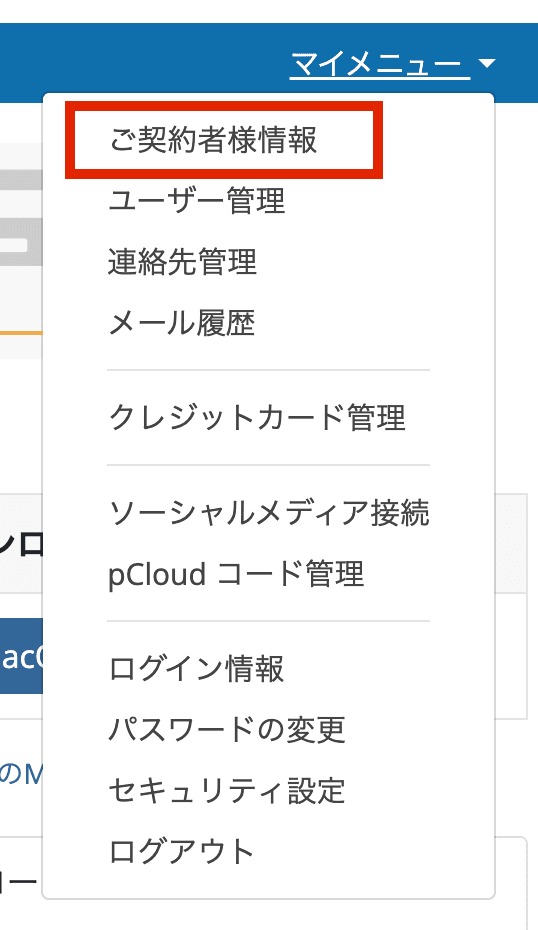
Click "My Menu" in the upper-right corner of the screen, then click "Subscriber Information."
STEP 3: Editing Subscriber Information
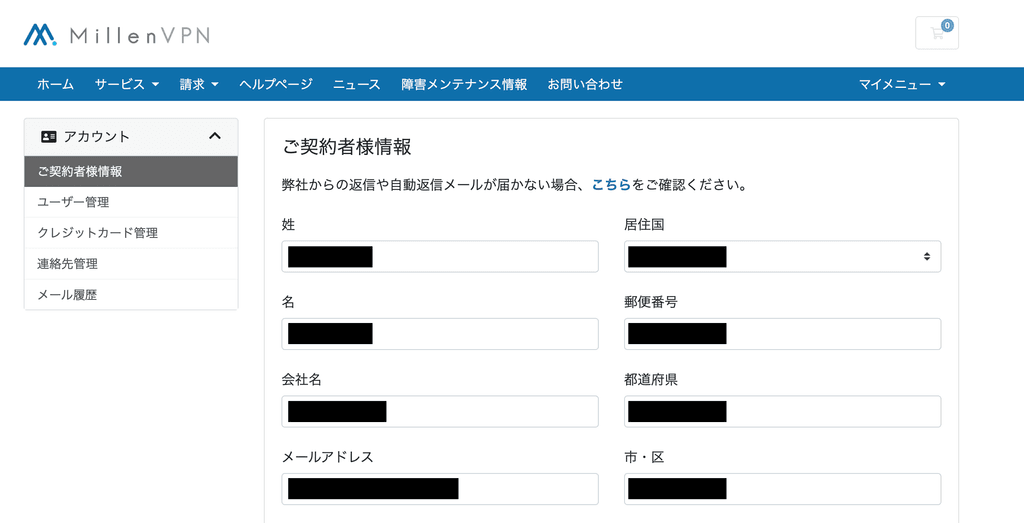
Edit the necessary information such as your email address and address.
STEP 4: Save Changes
Press the "Save Changes" button at the bottom of the screen to save your settings.
This completes the update to your account information.
- The personal information registered in your account details will be reflected in the billing address on your invoice.
The email address you have set will be the recipient for our informational emails (automated emails).
How to Change Your Email Address for My Page Login
How to Change Your My Page Login Information Please refer to.