
Steps to Change Your Payment Method
If you would like to change your payment method,My PageYou can change it from there.
The steps vary depending on what you want to change, so please check the applicable section.
- If you want to change the payment method for an invoice that has already been issued
If you would like to change the payment method for this specific payment only on an unpaid invoice,If you wish to change the payment method for an invoice that has already been issued Please review the steps below. - If you want to change the payment method for your entire account (for future payments, etc.)
If you'd like to use the same payment method for your next automatic renewal, or if you'd like to change the payment method for multiple subscriptions at once,If you'd like to change your account's payment method Please review the steps below.
How to Verify an Invoice
MillenVPN My PagePlease log in.
If you have any unpaid invoices, please follow the steps below: “Unpaid invoicesThe "..." item will be displayed.
If you would like to change the payment method for an invoice that has already been issued
STEP 1: Click "Show All" under the unpaid invoices section

STEP 2: Click "Unpaid" in the Status column

STEP 3: Select your preferred payment method

After making your selection, please review the details of the unpaid items in the upper-right corner of the screen.
The display may vary depending on the selected payment method.
- For credit cards
Please enter your credit card information by clicking the "Pay Here" button in the upper right corner of the screen.
How to Change Your Payment Credit Card InformationPlease also see the article.
- For PayPal Payments
Please log in to your PayPal account and make payment via the "Pay with PayPal" button in the upper right corner of the screen.
- For bank transfers
Please transfer the payment to the account displayed in the payment recipient section at the top right of the screen.
If you'd like to change your account's payment method
*The updated payment method will also apply at the time of your next renewal.
*Invoices that have already been issued will be updated to reflect the payment method you specified.
*If you have multiple service subscriptions, all of them will be switched to the payment method you specified.
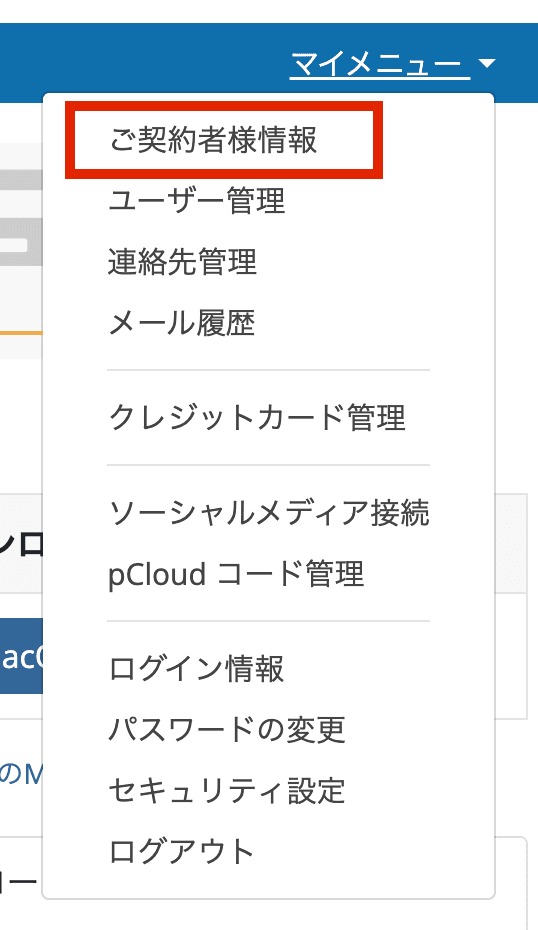
STEP 1: Click “Subscriber Information” in the My Menu section at the top right of the screen
STEP 2: Select your preferred payment method from the payment options, then click "Save Changes."

- For credit cards
Click "Payment Methods" from "My Menu" in the top-right corner of the screen, then enter the required credit card information using the "Add New Credit Card" button.
How to Change Your Payment Credit Card InformationPlease also see the article.
- For bank transfers
Please transfer the payment to the account listed on the invoice issued before the next renewal date.