
How to Change Your Payment Credit Card Information
How to Change Your Credit Card Information
You cannot change the details (expiration date, security code, etc.) of a credit card that has already been registered.
We apologize for the inconvenience, but please follow the steps below to register your new credit card information.
STEP 1: Open My Page
My PageOpen.
STEP 2: Open "Credit Card Management"
Located in the upper right corner of the screenMy MenuClick,Credit Card ManagementClick.
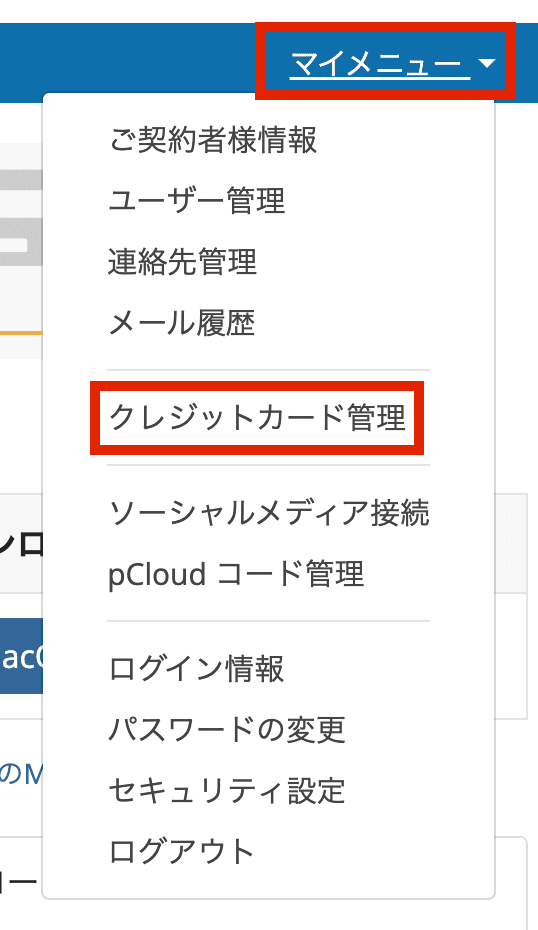
STEP 3: Add Credit Card Information
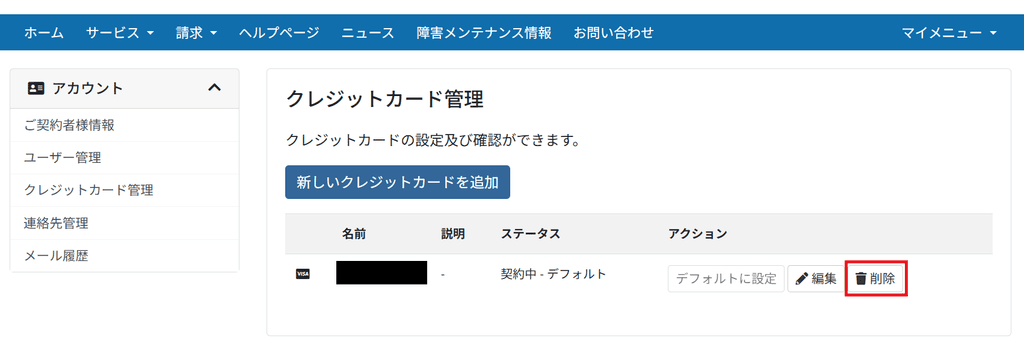
Click the "Add New Credit Card" button to register.

STEP 4: Set the added card as the default
Press the "Set as Default" button displayed to the right of the added card.
When your service is renewed, the payment will be automatically charged to the credit card on file.
How to Delete Credit Card Information
STEP 1: Open My Page
My PageOpen.
STEP 2: Open "Credit Card Management"
Located in the upper right corner of the screenMy MenuClick,Credit Card ManagementClick.
STEP 3: Deleting Credit Card Information
Click the "Delete" button and select "Yes" in the dialog box that appears.
If you are unable to delete your registered credit card information, please use the following format:SupportPlease contact us by [date].
——————
▼Credit Card Information Deletion Request Form
Please provide the following three details regarding the credit card you wish to delete.
Credit card brand:
Last 4 digits of card number:
Expiration date:
——————
However, please understand that depending on usage conditions, deletion may not always be possible.