
How to Use pCloud Codes
The pCloud code is distributed exclusively to customers with a MillenVPN subscription plan or a dedicated server.Promo Codeand the customerPurchased codeThere are two types.
Since each has a different method of use, I will explain them in order.
Promo CodeHow to Use
① My PageLog in.
②「My Menu」>「pCloud Code ManagementClick "".
③ When the screen appears, copy the promo code from the green background area (①) (you can also copy it by clicking the “Copy” button).
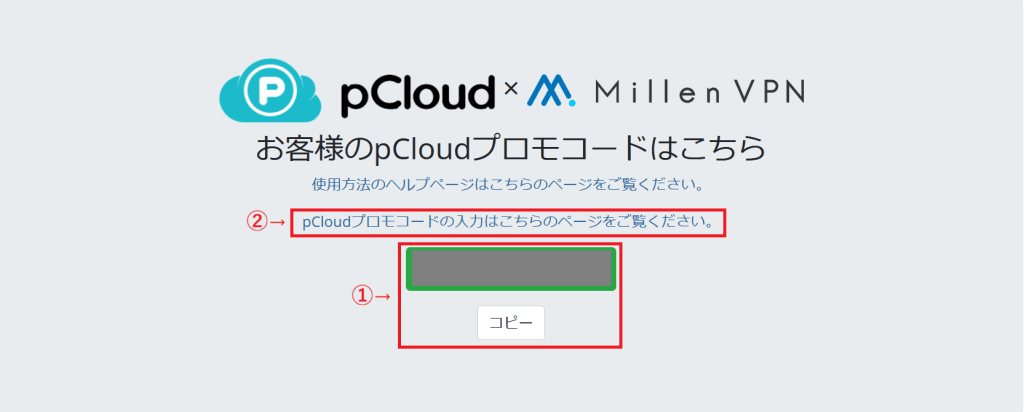
④ “Please visit this page to enter your pCloud promo code.Click the link (②) for "".
⑤ Enter the copied code on the pCloud page you were redirected to.
If you do not have a pCloud account, please enter your email address first to create a free pCloud account.


⑥ Once you've entered the promo code and successfully activated it, you'll be automatically redirected to your pCloud account page. Please continue using pCloud.
※If your bonus code expires, you will revert to the free plan. To continue using it, you must complete the following procedure.
[ pCloud Official Help ]
https://help.pcloud.com/ja/article/account-inactivity
How to Use Your Purchased Code
①Once you sign up for pCloud products and complete payment, you will receive "【MillenVPN】pCloud Code Issuance NoticeAn email will be sent.
②「【MillenVPN】pCloud Code Issuance NoticeCopy the "pCloud code" section from the email body and access the URL provided in the link that follows.
③ On the pCloud page you are redirected to, paste the code copied in step ② and submit it to activate the pCloud plan you applied for. If you do not have a pCloud account, please enter your email address first to create a free pCloud account.


Important Notes
- For bank transfers, once we confirm receipt of payment, we will【MillenVPN】pCloud Code Issuance NoticeYou will receive an email with a "________________________________________________________________________________________________________________". (Bank transfers are accepted in Japanese yen only. It may take up to 3 business days to confirm your payment due to the data reflected by the payment institution).
About pCloud Support
Rest assured, pCloud has a Japanese support team.
Other languages available for pCloud support include English, French, German, Turkish, Chinese, Dutch, and Bulgarian.
For questions about how to use pCloud or technical issues, please use the following.
[ pCloud Official Help ]
https://www.pcloud.com/help.html
[ Contact pCloud ]
https://www.pcloud.com/company/contactus.html
For an overview of pCloud, please see below.
[ pCloud Product Description ]
https://millenvpn.jp/pcloud/