
How to Resume a One-Time Plan That Has Been Temporarily Paused
You can resume a paused one-time plan and continue using it.
After service resumes, you can continue to use the same login credentials you used during your subscription.
Important Notes
- We are unable to specify a date for the resumption.
- Upgrades to the same one-time plan or subscription plan are possible.
You cannot resume using the service by selecting a different one-time plan.。 - Once the service restoration process is complete, your service will be restored as soon as we receive your payment.
For bank transfers, service will resume as soon as we confirm receipt of your payment.
*Bank transfers are accepted in Japanese yen only.
*Due to the time it takes for payment processors to update their systems, it may take up to 3 business days to confirm your deposit.
Steps to Resume a Paused One-Time Plan
STEP 1: Open My Services
MillenVPNLog in to your My Page and click "My Services."
STEP 2: Click the one-time plan you want to resume
If the status is "Paused," click the one-time plan you want to resume.
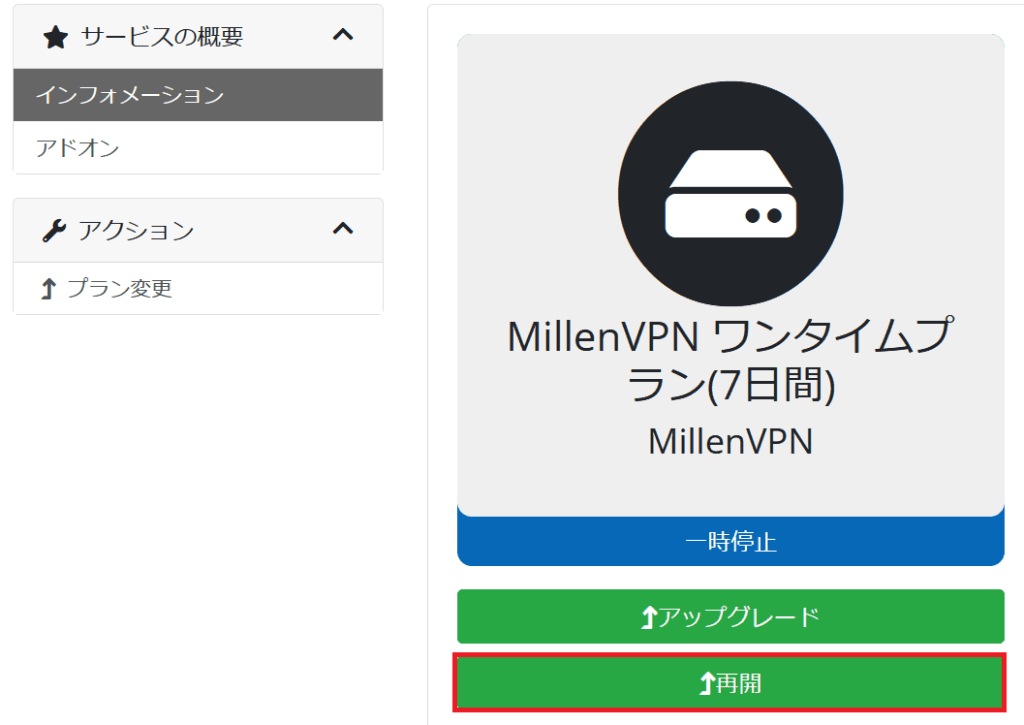
STEP 3: Click the "Resume" button
If you want to resume the same one-time plan: Click the "Resume" button
If you want to upgrade to a subscription plan: Click the "Upgrade" button (Your login information will be carried over as is)
STEP 4: Complete the payment
An invoice will be issued, so please select a payment method and proceed with the payment process.
Once payment is complete, your one-time plan will resume, and you'll be able to use the service again.